Your Post Advocates…

Ever since the early days of the ancient web/usenet, there have been arguments and disagreements. Someone is wrong. Laziness being the mother of invention, someone created a funny checklist that starts “Your post advocates a ___ approach to … Your idea will not work.” Some of the items are generic/funny enough to apply to any subject, others are specific to the original subject (if memory serves, it was regarding EMail and spam). Will it prevent Godwin’s 1st Law? Probably not!


Your post advocates a

(x) technical ( ) legislative ( ) market-based ( ) vigilante

approach to fighting copyright violations. Your idea will not work. Here is why it won't work. (One or more of the following may apply to your particular idea, and it may have other flaws which used to vary from state to state before a bad federal law was passed.)

(x) Virus and Malware authors can easily use it to infect more machines
( ) Independent content creators and other legitimate uses would be affected
(x) No one will be able to find the guy or collect the money
(x) It is defenseless against malware
(x) It will stop copyright violation for two weeks and then we'll be stuck with it
(x) Users will not put up with it
(x) Microsoft will not put up with it
( ) The police will not put up with it
(x) Requires too much cooperation from copyright holders
(x) Requires immediate total cooperation from everybody at once
(x) Many users cannot afford to lose access to the web or alienate potential employers
(x) Copyright violators don't care about the one or two machines in their botnets
(x) Anyone could anonymously destroy anyone else's career or business

Specifically, your plan fails to account for

(x) Laws expressly prohibiting it
(x) Lack of centrally controlling authority for PCs
(x) Open relays in foreign countries
( ) Asshats
(x) Jurisdictional problems
( ) Unpopularity of weird new taxes
( ) Public reluctance to accept weird new forms of money
( ) Huge existing software investment in SMTP
( ) Susceptibility of protocols other than SMTP to attack
( ) Willingness of users to install OS patches received by email
(x) Armies of worm riddled broadband-connected Windows boxes
(x) Eternal arms race involved in all filtering approaches
(x) Widespread examples of copyright violation
( ) Joe jobs and/or identity theft
(x) Technically illiterate politicians
( ) Extreme stupidity on the part of people who pay for 0-day camshots of movies
(x) Dishonesty on the part of violators themselves
( ) Bandwidth costs that are unaffected by client filtering
(x) Darknets

and the following philosophical objections may also apply:

(x) Ideas similar to yours are easy to come up with, yet none have ever
been shown practical
( ) Any scheme based on opt-out is unacceptable
( ) TCP headers should not be the subject of legislation
(x) Blacklists suck
( ) Whitelists suck
( ) We should be able to talk about Media without being censored
( ) Countermeasures should not involve wire fraud or credit card fraud
(x) Countermeasures should not involve sabotage of public networks
( ) Countermeasures must work if phased in gradually
( ) Sending random files should be free
( ) Why should we have to trust you and your servers?
( ) Incompatibility with open source or open source licenses
(x) Feel-good measures do nothing to solve the problem
(x) I don't want the government installing software on my computer
( ) Killing them that way is not slow and painful enough

Furthermore, this is what I think about you:

(x) Sorry dude, but I don't think it would work.
(x) This is a stupid idea, and you're a stupid person for suggesting it.
( ) You're more extreme than Big Brother

Other Old Stuff

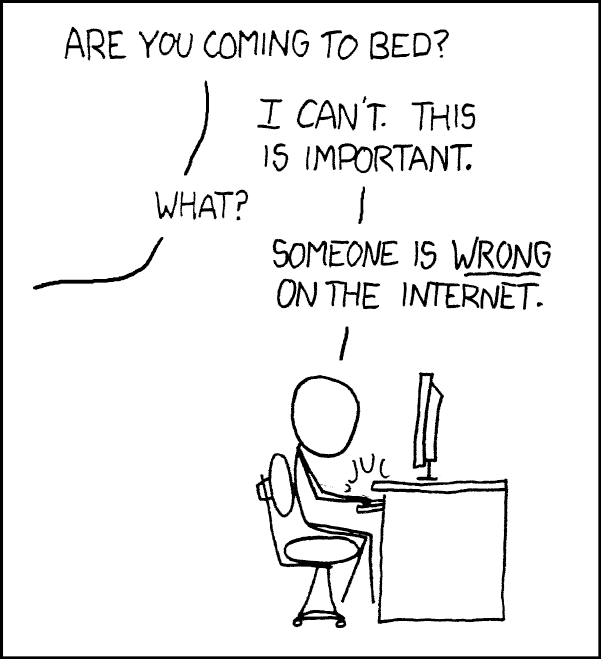
Obligatory XKCD:

one: Are you coming to bed? two: I can't. This is important. one: What? two: Someone is *wrong* on the internet.
Fighting the never-ending fight

Jakob Nielsen, Father of ‘Fast and Cheap UI’

World's Best CSS Developer

An early influence on my UI/UX interest was Jakob Nielsen at useit.com/alertbox. I devoured his articles on how people use the web, worst-practices (unfortunately far too many are still in use today), and common traps.

Learning from useIt.com, webpagesthatsuck.com and others, I grew my skills from definitely sucks to still sucks, but less. I started noticing how people use websites and how those sites are inadvertently designed to make things harder to get done. I would check in every once in a while to see the useit “state of the web” article on usability issues and successes.

A few weeks ago, I thought about the useit site and realized I hadn’t been there in quite a while—since probably before COVID—and decided to check it out. I noticed it redirected to NNGroup.com/articles. After clicking around for a bit, I tried to find the latest state of the web. I clicked on his author name on one of the old articles and it brought me to his page:

Jakob Nielsen, Ph.D., is a retired principal and co-founder (with Dr. Donald A. Norman) of the Nielsen Norman Group. Jakob established the "discount usability engineering" movement for fast and cheap improvements of user interfaces and invented the heuristic evaluation method.
RETIRED!

Wait, he got older and retired‽ Noooo…

All is not lost, as it seems others have taken up the mantle. There are State of UX 2026 and UX Year in Review Quiz for 2026, with hopefully more to come!

Related Sites

US Healthcare Websites are the Worst

How many healthcare websites were designed by someone who knows nothing about user interface design?

A: All of them

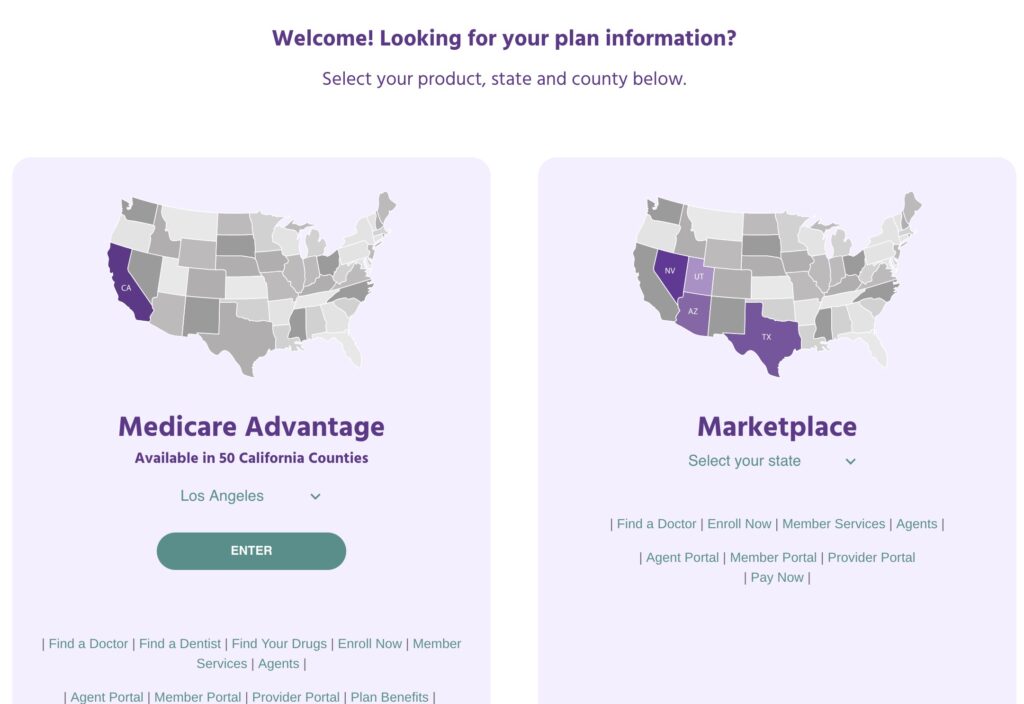
A mass of tiny links with no organization
Garbage Healthcare Insurance Website

Call to action? 🤣

Let’s say you wanted to log into the member portal. Where is it?

(I cropped the header off because this particular insurance company is not special in any way; they all suck more or less the same way)

Good luck, it is in the bottom of the screen. There’s no menu, no LARGE call to action. Nothing.

In fact there’s no menu at all.

The first time I tried to find it, I skimmed until I came to “Member Services” and clicked it. WRONG!

The link for the portal is below the member services link.

What can you do?

Nothing, absolutely nothing. Except learn from these idiots’ mistakes.

  1. Figure out what is the most-used function for your website.
    • For potential new customers,
      • a link to a plan summary that shows the difference between plans and their costs, and
      • links or buttons to enroll in a particular plan
    • For new customers, it is two or three things:
      • Getting an ID card,
      • Finding an in-network doctor, and
      • possibly paying the first month’s premium (rare) forget it, no one is going to do this unless you’re on Obamacare which was burnt and put up on blocks by the GOP.
    • For existing customers it is two things:
      • Checking balances (deductibles),
      • Reviewing Explanation of Benefits (EOBs),
      • Locating a doctor, and
      • Printing a new ID card
  2. Make the most-used functions FRONT AND CENTER, with as few actions (mouse clicks, scrolls, typing) as possible.
  3. Make it so your site does all the heavy lifting, figuring out what to place in front of the user based upon their needs.

What they did

Here’s what they’ve determined their customers are most interested in

  • Deciding whether they are Medicare Advantage or Obamacare patients

Then as an afterthought, at the bottom,
away from everything else,
in small print:

  • Find a doctor – will be used while a person is trying to figure out where they can go
  • Enroll Now – will only be used once and never again
  • Member Services – what the hell does that even mean? Will customers use this often or not at all?
  • Agents – Never used by any customer
  • Agent Portal – Never used by any customer
  • Member Portal – probably used by customers, a lot
  • Provider Portal – Never used by any customer
  • Pay Now – used by a tiny, tiny fraction of customers that don’t have job-provided insurance. Will only be used once to set up auto payment, except for that even smaller fraction of people who don’t trust autopay (probably 5 people)

Out of that whole mess, 13% (or maybe 26%) will be used by customers several times, 13% will be used once, 38% will NEVER be used, 13% will be used by a tiny fraction of customers one time (and a minuscule number more than once).

Worst case, 13% will be used by customers and 87% will not be used, yet they are almost all treated as having the same importance (for options on the second and third lines–which happens to contain the more-important options–they are slightly worse)

A clown sitting in the trunk of a car

Don’t do this. Ever.

Unless you’re a clown.

More Information

Why The Joel Test will save your life

If you haven’t seen it, it is Truth. Learn it, memorize it, evangelize it.

(maybe)

The Joel Test

  1. Do you use source control?
  2. Can you make a build in one step?
  3. Do you make daily builds?
  4. Do you have a bug database?
  5. Do you fix bugs before writing new code?
  6. Do you have an up-to-date schedule?
  7. Do you have a spec?
  8. Do programmers have quiet working conditions?
  9. Do you use the best tools money can buy?
  10. Do you have testers?
  11. Do new candidates write code during their interview?
  12. Do you do hallway usability testing?

We’re going to talk about #2.

Build

Let me paint you a picture:

You need to build two versions of app, one for French Guiana and one for France. Also, your app uses google analytics, google maps and some kind of crash reporting thing, all of which require tokens to access their respective APIs.

Being the Smart Developer you are, you don’t check your tokens into source code, because that would expose them to anyone who had access to your repository.

Instead, you edit the appropriate config files and add the token strings to the right fields. Your software repository ignores the changes to your config files so you don’t accidentally check them in.

You build your app for your default country, France, upload it to the app store and so on.

Now it is time to build it for French Guiana. Fortunately, everyone there speaks French, so no need to worry about translating anything (we don’t need no i18n!!1), so we just have a few changes…

  • Bundle ID
  • Google analytics tracking id
  • Google maps api key

If we don’t use a different analytics tracking ID, it will be difficult to determine usage for each app. Also, we want to keep the map’s api key separate so if one app’s traffic spikes, it won’t affect the other app.

One step

To satisfy the Joel test, we should be able to build with one step. This means ONE command.

One easy way would be to use ISO 3166 country codes.

France

app-build --locale=fr

French Guiana

app-build --locale=gf

However we do it, it should not involve any manual steps to complete. This will decrease the chance of making any mistakes, shrink the learning curve for new developers, and ensure that every deployment is done the same way.

Sprint Length?

Hourglass with sand dripping

I was asked a question recently: what’s the ideal sprint length?

To start, let’s look at the purpose and function of a sprint.

The Sprint: What and Why

A sprint is a period of time in which the team promises to deliver certain functionality. At the end of the sprint, the team is supposed to deliver working product that has some new functionality (or fixed functionality). This does a couple of things.

Hourglass with sand dripping

Benefits

  • It provides a timeboxed expectation. The product owner/stakeholders have a reasonable expectation as to when they will be able to see something new, and it is always on the same day and time. People are creatures of habit. I always have coffee Tuesday morning with my buddy, so Tuesdays are when I automatically eschew the cuppa joe at home, and my car automatically makes its way to our usual coffee shop.
  • It offers a sense of urgency and rhythm to the team. Good developers, by definition, are lazy. With an impending deadline, the desire to produce increases. Nobody wants to show up to the demo meeting and admit in front of everyone they have nothing to demo.
  • It feels like progress. Progress makes everyone happy, even the tiniest, little thing. We fixed that icon that everyone was complaining about. Oh and the app doesn’t crash when you get a call.
  • Most importantly, it sets up a time for feedback and pivoting. Long ago, when earbuds were something that grew in a garden, I was in charge of a project that ran for over a year. The team worked hard and produced a great product, and the client hated it. For one, they had only seen mockups on paper and never tried out the actual workflow. It is one thing to say, “okay, if I press this button, then I go to the details screen,” than to actually click the button and realize the details screen is useless and should have never been built. Worse, the business always changes. Always. Competitors build their own app and gosh we should have “shake to pay” too, or whatever they have. And we sold our forklift shop six months ago so we don’t need any of that functionality.

✅ Do this

The team (the people building the stuff) and the Product Owner sit down and figure out how long the sprints should be. The team will know what sort of reasonable time it will take to build and deliver a reasonable number of stories, and the Product Owner will know how often their boss will ask, “So what’s up with that thing you’re building?” so they can tell the boss that they have the latest one right here, and check out this SHAKE TO PAY feature.

🚫 Avoid

Do not, for the love of all that is good and right in this world, pick 3-4 weeks, or longer, unless your stories involve mounds of concrete drying or paint peeling, because a month is too long to wait for progress, too long to discover the equipment catalog just doesn’t feel right, and offers way too many opportunities for the Boss to ask about That App Thing, and you have nothing new to show them.

⚠️ Beware the urge

Remember whatever you pick, resist the urge to change, otherwise it will mess up everything and provide little value. Once you’re feature-complete, or MVP, or come to a stopping place, then you can make a new project. If you want to reuse the backlog, you may have to repoint.

Edit (30 Jan 2026) – Formatting

Automation: The Rule of Three

How many licks?

Building, Fixing, Writing, Saying something?

Do it one time – sounds good

Do it twice – a bit annoying

Do it three times – you’ve crossed the line

Time to AUTOMATE

If you have to do the same thing the same way three or more times? Time to automate it.

Write a script, built a bot, buy a program, whatever.

You might spend as much time, or even a little more, automating it, but then the 4th+ times are free, performed accurately and correctly, and taken off your plate.

Now you can do something fun.

Update (30 Jan 2026) – formatting + xkcd

Processing a group of images for Cordova

When you have a group of images that you want to use for your cordova app’s splash screen, it can be tedious to get their dimensions and then add them to the cordova.xml file.

You have to examine every image, get the height and width, then create the entry for it:

<splash src=”” width=”#” height=”#” />

Wokers
Courtesy State Library of NSW

The Scenario

I was recently faced with doing just this for a mobile app, which had group of 18 icons. The Rule of Three comes right into play here, so a short while later, I banged out a one-liner using sed, of course!

The Solution

for i in *.png; do 
    identify $i|sed -e 's/^/<splash src="/' -e 's/png[^ ]*/png"/' -e 's/ PNG / width="/' -e 's/x[0-9]* [0-9]*x/" height="/' -e 's/+.*/" />/g' 
done

Dependencies

The code assumes you have imagemagick installed and available in your path, specifically the identify utility.

It also only works against PNGs as that’s what I use for mobile apps. It shouldn’t be too hard to change this by examining the output of the identify utility and adjusting the sed commands accordingly.

Output

The output looks like this:

<splash src="bitmoji1272828.png" width="398" height="398" />
<splash src="flag_final.png" width="229" height="146" />
<splash src="line_guy.png" width="302" height="455" />
<splash src="ikcron_92.png" width="128" height="128" />

See Also

Using Story Points Correctly

tl;dr

Your sprints will be successful if you use points as relative work and if you base your sprints on your team’s average point completion rate. Otherwise, you will either not complete as much as you expect or you will complete stories faster than expected, setting you up for failure in future sprints.

People taking notes in a meeting
Photo by Dylan Gillis on Unsplash

Points are relative work

Points are used to compare stories against the smallest amount of work (e.g., changing CSS colors, fonts or some other simple thing). I wrote more about that previously in How Not To Use Story Points.

If a story is pointed at 3, asking the developer to “point it a 5” will not make the story result in higher quality, include more features or be done faster (or slower). The work drives the points not the other way around.

Pointing Stories

How stories are Pointed is just as important. It is easy for the developer to hem and haw and pull a number out of the air, but that leads to poor pointing. Instead we want to mix in some rubber ducking.

A rubber duck sitting on a laptop keyboard
A rubber duck assisting with debugging some Java code in NetBeans.

To do this, the developer needs to explain the story in enough detail so that someone not familiar with the work can understand the level of effort that it requires to complete the story.

For example, a story to add a log in screen to a page might be described like this:

  1. The screen has the following elements:
    • email and password fields
    • a “login” button
    • a “forgot password” link, and
    • a “signup” link
  2. Both fields are required and appropriate error messages will display if either are not filled out when the login button is pressed.
  3. If the credentials are incorrect, a notice will be displayed with the text “email and/or password incorrect”, the password field is blanked, but the email field retains whatever value was previously entered
  4. Clicking the forgot password link will go to the password recovery screen
  5. Clicking the signup link will go to the registration screen
  6. If the user successfully signs in, they will go to the dashboard screen

Voting

Once the story is adequately explained, then the developers must all vote on it. This serves as a “reality check” and prevents skewing by any one person. Whereas one person may see the work at one number, others may view it at another. The rough average of votes is taken (sometimes throwing out the high and low, depending upon the group) and fit in the point scale: if the team used the fibonacci scale and a vote average was, for example, 4, it would be pointed as a 5 to fit in the scale.

The most effective voting system is done where no one can see how the others voted until all the votes are cast. This prevents issues of groupthink.

The Sprint

Keeping track of the average number of points delivered in prior sprints is a good way of estimating the number of points one can expect the same team can deliver in the current sprint. Remember, the work drives the points, not the other way around, so insisting the team deliver Widgets 1 through 5, when the points say they should only be able to deliver 1 through 3, is the way to deliver even less.

Things that can affect delivery are team members’ absences (due to planned vacation or sickness), bugs and mispointing.

If a team member is absent, they obviously cannot deliver the points they normally could. If the absence is planned, then reducing the expected points for that sprint is one way to mitigate the risk.

Bugs should never be pointed, because they do not add value and cannot be sized against stories. Bugs are bugs, so time spent on bugs is expected to cut into time available for building features. This will naturally reduce the expected point delivery over time. The average point delivery will reflect bugs the team encounters.

Mispointing is less of a concern when there are enough (3-5) developers present to vote on each story. If the story is sufficiently described, and outliers are discarded, better accuracy can result.

DRYing up tasks makes life easier

When writing scripts that perform the same task over and over again with different parameters, it is tempting to just cut and paste. Here’s an example of a bash script:


#!/usr/bin/env bash
grunt make_magic --dir=/foo
grunt make_magic --dir=/bar
grunt make_magic --dir=/lorem
grunt make_magic --dir=/ipsum
grunt make_magic --dir=/magnum
...

Imagine that goes on for hundreds of directories!

This isn’t very DRY. If we wanted to add an extra parameter to the grunt command, we’d have a lot of editing to do.

If we needed to do another command on those very same directories, we would have to enter the directory names again. As you can see, it would be very easy to forget to add all of them.

DRY

DRY stands for “Don’t Repeat Yourself”. If some code or commands are duplicated elsewhere, that’s a sign that there are inefficiencies in the code.

The idea behind this is to pull out common code into functions/methods. When a change to that code is required, it only needs to be made once. If a bug is identified in the code, once it is fixed, it is fixed “everywhere”.

DRYing

Let’s take the example above and dry it up. We have to run the same command with different parameters (directories), so we will create an array of directories:

DIRS=( foo bar lorem ipsum magnum )

Now we write a “for…each” loop to do something for each element in the array:


for thedir in "${DIRS[@]}"; do
grunt make_magic --dir=/$thedir
done

This works on each element of the DIRS array and assigns it to thedir variable, which is now available inside the block.

Using this technique, it is very easy to add additional commands and/or directories.

How (not) to use Story Points

Abstract (tl;dr)

Story points should never be used to represent hours, but simply relative size of effort to complete a story. Over time, the team will tend to complete a consistent range of story points each sprint. Trying to tie story points to duration breaks the model and leads to inaccurate forecasting. Points should not be used to compare teams, nor should they be used to compare bugs.

Introduction

In Agile projects, each work packet is called a Story. Each story has a point value assigned to it.

I prefer to use the Fibonacci scale for story points.

1, 2, 3, 5, 8, 13

Each number is the sum of the previous two numbers (3 = 2 +1; 8 = 5 + 3; etc).

But what do these points mean? We will get to that in a minute, but first let’s examine how difficult it is to estimate sizes.

Glass of Water

A glass of ice water with straw and a lemon slice.
A Glass of Water

How many ounces of water is in the glass? If you’re like most people, that is not an easy thing to guess.

On the other hand, if I compare it to the glass below, I might say is has roughly twice as much water, and I would be mostly correct.

Glass half-full of water
Another Glass of Water

This is the concept of story points.

1 is the baseline amount of work.

2 is twice as much effort

3 is three times as much, and so on.

Either 8 or 13 are “too big to do”—otherwise known as EPICs—and are slated to being broken up into smaller stories later.

The reason this is done is because it is easier for humans to judge a relative size than an absolute size.

Smallest amount of work

The effort of the smallest amount of work is considered a “1”. For web projects, this is often the effort required to change some element’s CSS style (color, font, size, etc).

Every other story is compared to this task.

Count the points

During the course of the sprint, the team completes the stories. And the end of the sprint, all completed story points are summed and that is the number of points completed for that sprint. After 3-4 sprints are completed, the average number of completed points for the prior three sprints is a good indicator of the number of points the team will complete in the next sprint.

Sprint 1Sprint 2Sprint 3Average
14181415 (rounded down)

As you can see, points cannot be hours because the number of points varies, based upon many factors:

  • Team members’ skills
  • Team leader’s leadership
  • Distractions/work environment
  • Complexity of work
  • Tools/equipment quality

Points are not fungible

fungible (fŭnˈjə-bəl)

adj. Interchangeable.

Points are not fungible, that is, they are tied to the team. One can’t judge one team’s performance against another’s by counting points, because of the factors that cause variability in points. One team might complete 15 points in a sprint, while another might complete 40. The first team is not worse than the second team; points mean different things for the two teams.

Bugs don’t Point

Lady standing in front of a huge waterfall
Huge Waterfall

You can’t point bugs. Well, you can, but you’re making a huge (huuuuuge) mistake. When pointing stories, one needs to explicitly lay out the tasks required to complete the work. Then, that work is compared to the Smallest Amount of Work and given a point.

Bug HAVE NO defined tasks required to complete the work because no one knows what is causing the bug. What are the exact steps required to fix it? There aren’t any; one simply works the problem until it is fixed.

For example, let’s take the “bug” of me losing my car keys. How late will I be? If I estimate the tasks to find my keys, it will be something like:

I will look:

  1. In my backpack
  2. On the table
  3. In my pants
  4. On the kitchen counter
  5. On the bathroom counter
  6. On the nightstand next to my bed
  7. Under the nightstand next to my bed

Given all that, when will I find my keys? After #1? After #8? Later?

Edit (30 Jan 2026) – Formatting, images