Tag: security

Your Login “Security” Is Awful

You want to log in? No problem!

Put in your email, press enter.

We’re not asking for your password at the same time, because we hate password managers. Everyone knows you’ve memorized them, or use the same one, or whatever.

Oh, wait, we don’t want your password!
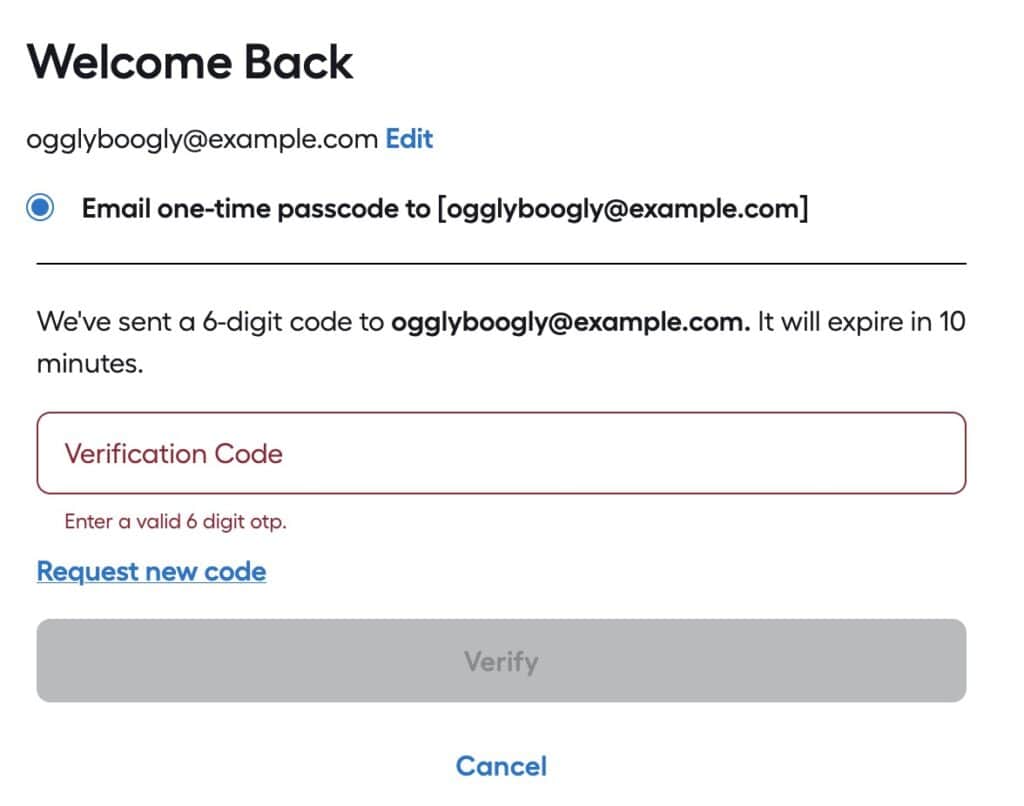
We've sent a 6-digit code to ogglyboogly@example.com. It will expire in 10 minutes.
I hate you.

We’ll email a code and you have TEN MINUTES to type it in! What’s the problem?

The “Problem”

The reason why one would set an expiration time on a verification email is so the verification can’t be intercepted after the fact and used to log in.

For example, if a user tried to log in and forgot to check their email, someone later could look at their email, find the verification message and use it to log into the user’s account. That’s fine.

In the above case, the developers are expecting a user’s account to be SO COMPROMISED, they can’t afford to leave it exposed for more than 10 minutes!

Email is slow

Well, not slow, but not guaranteed to be there instantly.

Showing an email moving from sender to receiver
Email passing through nodes (GPT)

Emails from a sender to a receiver have to pass through one or more relays–and those relays can delay transmission for seconds, minutes or hours. One potential issue is if a transmission between two relay nodes must be resent due to errors.

An email sent to your neighbor can potentially take longer than one sent to a friend in another country; it all depends upon the speeds of transmission and delay between notes.

Options

There are several alternatives to using a verification email with a 10 minute expiration, that have less of a burden upon the end user and still provide security. Relying upon a user’s email account is risky, as that is one of the prime goals of attackers: take over a user’s email account and you can gain access to most of all their accounts on other services via the “forgot password” action.

Good

First, don’t set the email expiration time too soon. If you set it to expire in an hour, that is a good compromise between leaving the login ‘exposed’ and giving the user a reasonable time to receive the email and use it.

Once the code/link/token in the email is used it should become invalidated so it can’t be used again. This will vastly reduce the danger of a bad actor somehow gaining access to the verification email and thus the user’s account. They would still have to get the email and try to log onto the account before the actual user did.

Better

  • Use SMS to send a validation code/token, which is more reliable as the nodes are designed for fast communication.
  • Give the user an option to use a regular (long) password, or a token from an authenticator app instead of a validation email. As of 2026, passwords shorter than 11 characters are mostly useless from brute-force guessing. Using a password manager to generate longer passwords (e.g., 30 characters) is a good approach. Enforcing complexity (e.g., uppercase + number + lowercase + special character) has little bearing on security.

Best

Use passkeys.

☠️ Security Questions = PWND ☠️

Another excuse for me to say that security questions are a tell the developers aren’t skilled in securing applications, and they happen to be climbing on Mt. Stupid.

A historic black-and-white photo of a train wreck, illustrating the importance of accurate project estimates.

Security questions give you the opportunity to use a weak password to bypass a strong password (or passkey, authentication token, email verification, etc).

The Importance of Not “Designing” your own Security

Recently, at a client, I had the opportunity to review their security implementation on their website. I realized that it is very important to never try to design one’s own security, because of the Dunning Kruger effect. In a nutshell, folks who don’t know very much about security think they know “enough,” and folks who are very knowledgable (e.g., Bruce Schneier) realize they don’t know all that much.

So what does this mean? It means simply this:

Broken bike lock
Not so secure now, is it?

If you design your own security system, you’re going to get it wrong.

Here are some examples of how to get things wrong.

Storing passwords in plaintext so you can send the person the password if they forget.

When (not if) someone breaks into your database, they instantly own every single account. They can log in, view your user’s details and change them. Since most people reuse the same password for multiple systems, the attacker can try those passwords on other popular services, such as Facebook, GMail, LinkedIn, Twitter, etc.

Relying on application-level security to protect your data.

This is dangerous because it is hard to ensure 100% coverage. EVERY access point—of many—to your data must be secure. Failing to cover one point leaves the system wide open. A better solution is to apply security at the data-store level. Typically, this is done using triggers and stored procedures. Your RDBMS doesn’t support those (or weakly supports them)? Find another RDBMS.

Using the same salt for every password in the system.

You don’t understand what salts are for and how to use them properly.

Requiring “complex” (a number, upper- and lower-case letters and symbols but not very long) passwords.

Nope. Ineffective.

Relying on Two-Factor Authentication.

For now it is working, somewhat, but crackers are rapidly finding ways to circumvent this technique.

Relying on a “security question” in case the person forgets his/her password.

Oh, you’ll love this. You’re creating a weak password as a backup to a (hopefully) strong password. Fail.

Assuming by keeping the details of your implementation secret, you will be secure.

This is dangerous because you think you’re secure. In fact, you are less secure. Kerckhoffs’s Principle is always a good starting point for security implementation: if an attacker could see all of my code and had a copy of my database, could she/he break into my system?

Getting it right

The first step is admitting that you don’t know what you’re doing.

Now go find someone who does: there are plenty of security libraries out there for every language. Find one that is mature and widely used and implement it. Keep up to date on the library’s mailing list so you will receive alerts, and update whenever there’s a new version.

Security is hard to do. It is extremely hard to do correctly. Don’t fall into the trap of thinking you can get it right without years and years of study and experience.

Related articles

Edit (30 Jan 2026) – Formatting, fixed links, added missing image